
Day 38: Player health and damage
Updated: Sep 5, 2023
My plan for the day:
I wanted to add in a basic health bar and a method to take damage, along with animations for taking damage and the player dying.
What I accomplished:
I started off by creating a canvas and an image. I renamed both to healthbar, and created a suitable size for the healthbar, positioned at the top right of the screen. I then added in a slider connected to the image, so that the health could be adjusted with the slider. Another image was used to create the background of the healthbar, which I set to black, and the main color as dark red. Once this was done, I created a new script called health bar, which would store the max health, current health and how much damage was taken. I also used the slider in the script to move down every time damage was taken. Once that was done, I imported in some unity assets to create a temporary damage source: fire. I positioned four fireplaces around the plane, and added capsule colliders to all of them. I created another script called DamagePlayer, in which I mentioned how the collider would use the TakeDamage function from the health bar script to deal damage and reduce the player's health. Once that was done, I added in 1 final script for player stats, which I would not use now, but for future addition to the project. Going into mixamo, I selected a suitable damage animation, and added that into the animator, along with the death animation. This is what the result came out to be.
______________________________________________________________________________________________________
Video Link: https://clipchamp.com/watch/6CkBlmJiu0R
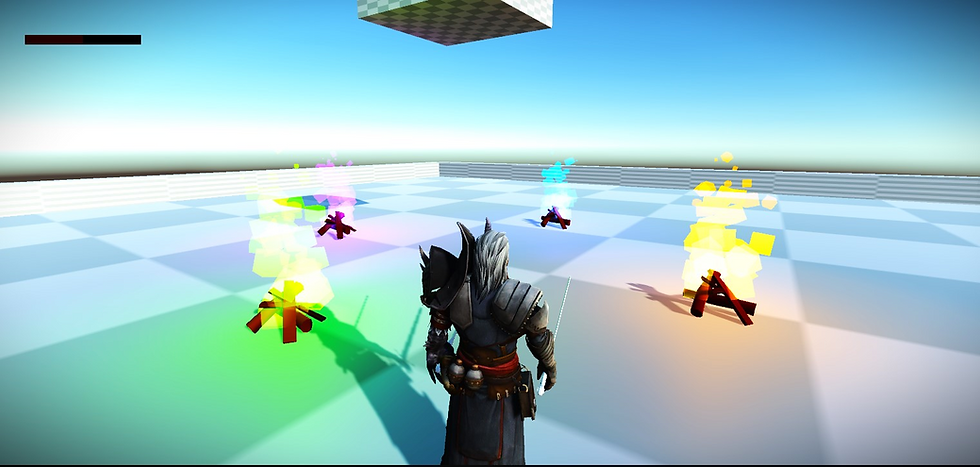
Image Source: The Unity Game


Comments